roos-fs tasks #840
open
(PROJECT) Service List + Filtering Logic for Planning Module
Added by Vadim Pariev 7 months ago.
Updated about 2 months ago.
Description
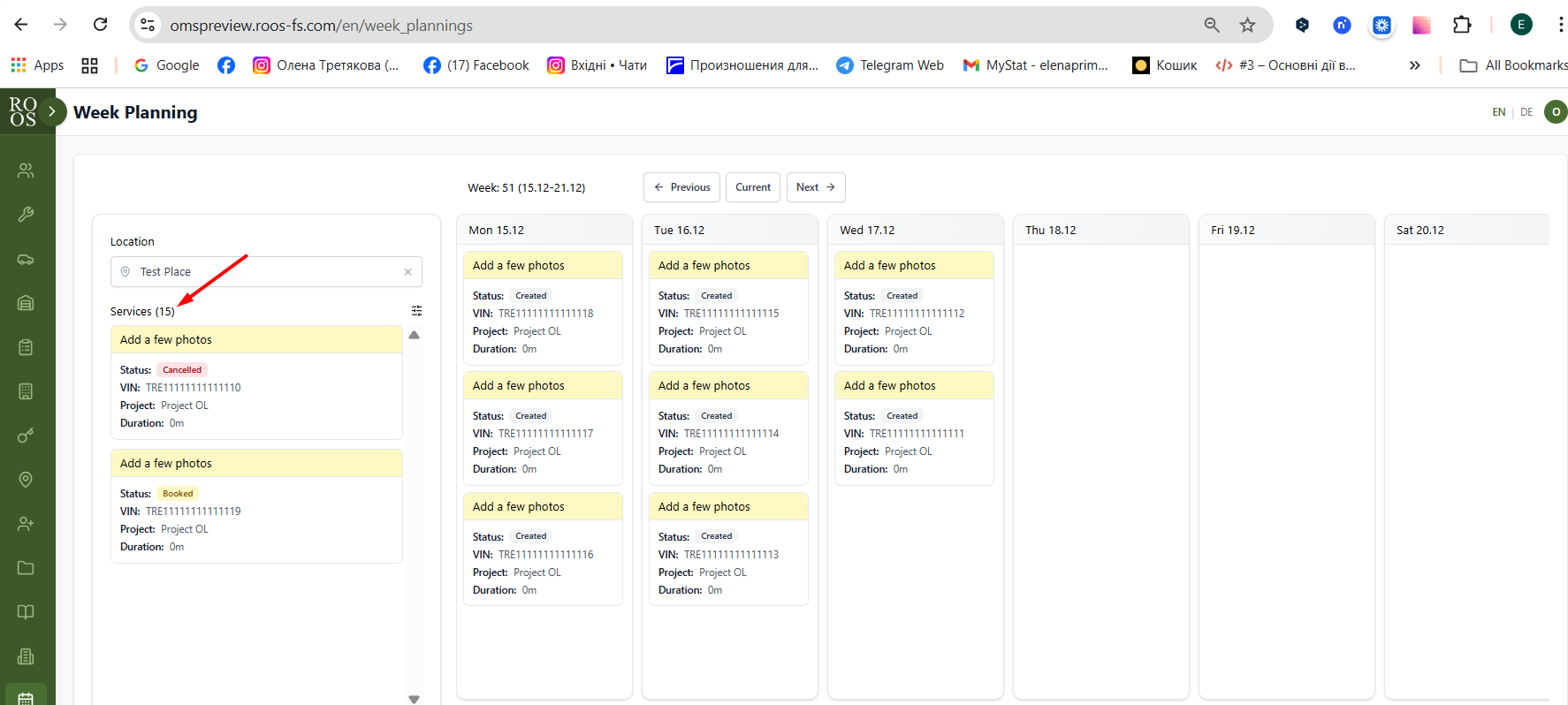
On the left side of the planning view, users should see a section listing all services available for planning.
These services originate from projects that already exist in the system adn the location the user has selected.
The services displayed must dynamically update based on the selected location, following specific filtering logic.
Business Rules and Logic
- Source of Services
- Every service (shown in the list) belongs to a vechicle that is assigned to a location.
- When a location is selected, the system should automatically show only services from the project(s) assigned to that location (through the vechicles).
- Project-Based Filtering
- as soon as the location is selected we need to show the user that there are services from different projects
Like:
Bettery check 10/49 (ALready planned in other locations/planned for the week - the last value is take from the ,anual input plan from the porjet menegement area)
Wheel exchange 49/49
- Additional Filtering Options
- Users can manually filter services by selecting a specific project.
- When a project is selected, the list should show only services belonging to that project.
- Service List Content (What must be shown)
Each service entry must display:
- Service ID (unique identifier)
- VIN number
- Vechicle status
- Project
UX requirements. it shall be easily distinguishable what location and project this service belongs to.
Files
- Description updated (diff)
- Assignee set to Max Zadorozhniy
- Status changed from Backlog to Open
- Assignee changed from Ivan Danyliv to Danyl Kozub
- Estimated time set to 4:00 h
- Status changed from Open to In progress
- Description updated (diff)
- Status changed from In progress to In review
Vehicle filter wasn't implemented due to missing logic in main branch
- Status changed from In review to Deployed (QA)
- Assignee changed from Danyl Kozub to Olena Tretjakova
Environment: Staging.
Actual Result:
- the vehicle status does not display in the service card.
- the number of services is shown incorrect.
Other acceptance criteria have been met except:
Acceptance Criteria : Service List in Planning View (Left Panel)
- Service List Visibility
- The planning view displays a Service List section on the left side of the screen.
- The Service List is visible only after a Location is selected.
- If no Location is selected, the Service List shows an empty state.
- Source of Services
Each service displayed in the Service List:
- Belongs to a vehicle assigned to the selected Location.
- Services are sourced only from projects that are linked to vehicles assigned to the selected Location.
- Location-Based Filtering
When a Location is selected:
- The Service List automatically updates.
Changing the Location:
- Clears the previous Service List.
- Loads services that match the newly selected Location.
- Each Service displays:
- Service Name
- Service Status
- VIN of vehicle
- Manual Project Filtering
When a user selects a specific Project:
- Only services belonging to that Project are shown.
- Clearing the Project filter:
- Restores the full list of services for the selected Location.
Each Service displays:
- Service Name
- Service Status
- VIN of vehicle
- Project name
- Duration
covered in the upcoming tickets, since the functionality required for the development came later as it was wished. Hence could be closed
- Status changed from QA Failed to Ready for Deployment (prod)
- Assignee changed from Danyl Kozub to Vadim Pariev
- Status changed from Ready for Deployment (prod) to Closed
- Project changed from 8 to Roos-fs-ZIP
Also available in: Atom
PDF


 Updated by
  Updated by
  Updated by Olena Tretjakova
  Updated by