roos-fs tasks #836
open
(PROJECT) Implement Collapsible Left-Side Menu
Added by Vadim Pariev 7 months ago.
Updated about 2 months ago.
Description
The left-side menu needs to become collapsible, allowing users to expand or collapse it using a toggle arrow. When collapsed, the menu should reduce to a slim vertical bar that still displays key icons. The rest of the application layout must automatically adjust to the collapsed/expanded state. This is needed to host a new functionality - project management.
Requirements
- Add Collapse/Expand Toggle
- Add an arrow button at the top of the left-side menu.
- When clicked:
- If the menu is expanded → collapse it.
- If the menu is collapsed → expand it.
- The arrow icon should also rotate accordingly to indicate the next action.
- Collapsed State Behavior
- When collapsed:
- The left menu shrinks to a minimal-width strip (icon size).
- Only menu icons remain visible (no labels).
- Hovering over an icon may show a tooltip with the name.
- The collapsed version must remain fully functional for navigation.
- Expanded State Behavior
- When expanded:
- Full menu width (e.g., 240px) is restored.
- Icons + labels are visible.
- All menu groups and items function normally.
- Responsive Layout Adjustment
- The entire screen layout must adapt when the menu changes state:
- The main content area expands when the menu collapses.
- The main content area shrinks when the menu expands.
- No overlapping or layout breaking should occur.
- The UI must remain fluid and responsive.
- Persistence
- The system should remember the user’s last chosen state (collapsed or expanded), so it remains consistent across page reloads.
- Visual Requirements
- Smooth animation for collapse/expand.
- Clear indicator arrow (left/right depending on state).
- Icons remain centered within the collapsed menu.
- Divider separators should scale properly.
- General consistency
Files
- Status changed from Backlog to Open
- Status changed from Open to In progress
- Estimated time set to 12:00 h
- Status changed from In progress to In review
- Status changed from In review to Deployed (QA)
- Assignee changed from Ivan Danyliv to Olena Tretjakova
Environment: Staging.
Actual Results:
The label text is partially visible in the “Teams” tab, and no tooltip appears when hovering over the “Teams” tab.
After clicking the “Save” button on the “Documentation” page:The left-side menu expands unexpectedly instead of remaining collapsed.
Acceptance Criteria:
- A collapse/expand toggle arrow is displayed at the top of the left-side menu.
- Clicking the toggle collapses or expands the menu accordingly.
- The toggle icon rotates to indicate the next action.
- Collapsed state:
- Menu reduces to icon-only width.
- Only icons are visible; labels are hidden.
- Icons remain clickable and functional.
- Tooltips display menu item names on hover.
- Expanded state:
- Menu returns to full width.
- Icons and labels are visible.
- All menu items function normally.
- The main content area resizes dynamically when the menu state changes.
- No layout overlap or visual breaking occurs.
- The menu state (collapsed/expanded) is persisted across page reloads.
- Collapse/expand transitions are smooth and visually consistent.
Steps to Reproduce:
- Open the main page https://omspreview.roos-fs.com/
- 1,2,3,4 acceptance criteria have been met.
https://screenrec.com/share/rvxLKwgObo
https://screenrec.com/share/XL6IlVo3gq
- All collapsed states have been implemented correctly except:
The label text is partially visible in the “Teams” tab, and no tooltip appears when hovering over the “Teams” tab.
After clicking the “Save” button on the “Documentation” page:The left-side menu expands unexpectedly instead of remaining collapsed.
- All expanded state have been implemented correctly.
- 6,7,8,9 acceptance criteria have been met.
- Status changed from Deployed (QA) to QA Failed
- Assignee changed from Olena Tretjakova to Ivan Danyliv
- Status changed from QA Failed to Open
Additional:
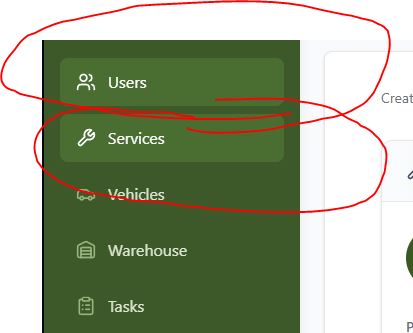
Howerovers, do not change the exisitng designs
ON LIVE
ON STAGE
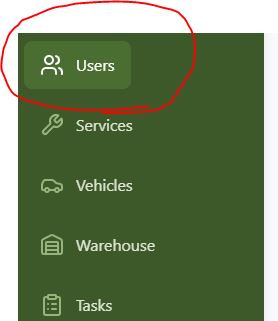
Make sur that the implimentation stays.
Make sure that when selected the area is also highlited.
- Status changed from Open to In progress
- Status changed from In progress to Open
- Status changed from Open to In progress
- Status changed from In progress to Open
- Status changed from Open to In progress
- Status changed from In progress to In review
- Status changed from In review to In progress
- Status changed from In progress to In review
- Status changed from In review to Deployed (QA)
- Assignee changed from Ivan Danyliv to Olena Tretjakova
- Status changed from Deployed (QA) to Ready for Deployment (prod)
- Assignee changed from Olena Tretjakova to Vadim Pariev
Environment: Staging.
Actual Result:
All acceptance criteria have been met.
- Status changed from Ready for Deployment (prod) to Closed
- Project changed from 8 to Roos-fs-ZIP
Also available in: Atom
PDF


 Updated by
  Updated by
  Updated by
  Updated by Olena Tretjakova
  Updated by