roos-fs tasks #758
open
Allow to add PDF as a file type to the Media module
Added by Vadim Pariev 7 months ago.
Updated about 2 months ago.
Description
General
We have a seperate Item in the chek lost called photo upload that is normally used to upload a picture.
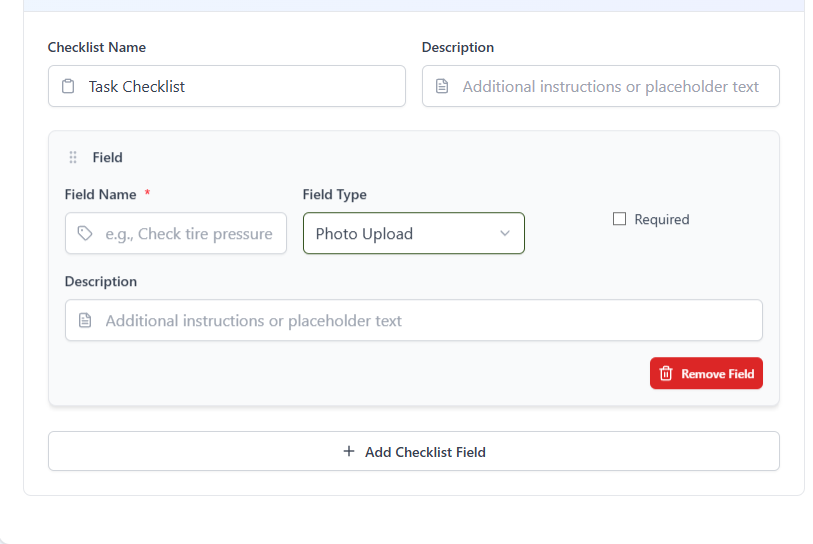
Expecte result:
- User can now also upload the PDF to the task using this module
- the size limitation for these files is to be increased to be 50 MBs
- the user shall be able to view the added file (analog to the picture)
- fix the preview of the picture function in the task overview
Files
- Assignee set to Ivan Danyliv
- Status changed from Backlog to Open
- Status changed from Open to In progress
- Status changed from In progress to In review
- Status changed from In review to In progress
- Status changed from In progress to In review
- Status changed from In review to In progress
- Status changed from In progress to In review
- Status changed from In review to Deployed (QA)
- Assignee changed from Ivan Danyliv to Olena Tretjakova
- Status changed from Deployed (QA) to Ready for Deployment (prod)
- Assignee changed from Olena Tretjakova to Vadim Pariev
Environment: Staging.
Steps to Reproduce:
- Open 'Tasks' page. Select 'PDF' task (Task ID: 43053).
- Add add PDF file to the first field. The PDF file is added.
- Add add PDF file to the second field. The PDF file is added.
Attachment:
https://screenrec.com/share/w3MJndclTi
- Status changed from Ready for Deployment (prod) to Closed
- Project changed from 8 to Roos-fs-ZIP
Also available in: Atom
PDF


 Updated by
  Updated by
  Updated by
  Updated by Olena Tretjakova
  Updated by