roos-fs tasks #401
open

Issue with the report dublications
0%
Description
General
Strange behavior is seen with some reports in the online Environment.
Some of the services upon completion receive not 2 completion reports but 4 or even 6. The Only trigger for this is the event of completetion of the report that trigger the PDF report generation.
Example of this behaviour:
Service ID: 5908
Service ID: 5924
Service ID: 5494
Expected result
- find the rootcause of the issue and state here in the comments
Files
 Updated by Vadim Pariev 9 months ago
- Description updated (diff)
- Assignee changed from Anton Obolientsev to Ivan Danyliv
 Updated by Ivan Danyliv 9 months ago
· Edited
Updated by Ivan Danyliv 9 months ago
· Edited
The root cause is that the job can be enqueued multiple times in certain scenarios:
- The transaction is not yet committed, and complete! is called multiple times (for example, due to a frontend bug or double-click).
- The object is saved multiple times within a single transaction, causing the after_commit or after_save callbacks to trigger multiple job enqueues (rare cases).
Updated by Ivan Danyliv 9 months ago
- Status changed from In progress to In review
 Updated by Anton Obolientsev 9 months ago
- Status changed from In review to Deployed (QA)
 Updated by Olena Tretjakova 9 months ago
Environment:
OS: Windows 11 Version 24H2 for x64-based systems(KB5065426) (26100.6584)
Browser: Chrome 140.0.7339.186 (Official Build) (64-bit)
Platform: Desktop
Executor: Tretjacova Olena
Preconditions:
- The 'Services' page is opened.
- Click on the button '+Create New Service'
- 'New Service' page is opened.
- Select 'OIL CHANGE TEMPLATE' in the Select Template section.
- Select 'OLENA098765432112' in the Assignment Vehicle section.
- Click 'Create Service'.
- The service was created.
- Open the 'Services' page.
- Click the view icon next 'OIL CHANGE TEMPLATE' service in the table.
- The Service Detail page is opened.
- Pass the steps to complete the service.
Steps:
- Open the Services page.
- Click the 'Export Completition Reports'
- Select Start Date and End Date : 09/29/2025.
- Select Customer : 'Tretyjacova-company'.
- Select Vehicle : OLENA098765432112.
- Select PDF Report in Export Type section.
- Click 'Download Reports' button.
Expected Result:
One PDF report in EN is downloaded.
One PDF report in DE is downloaded.
Actual Result:
Two PDF report in DE is downloaded.
Two PDF report in EN is downloaded.
Attachment:
Updated by Vadim Pariev 9 months ago
· Edited
Olena hi,
I belive you have a false result here, in the video you have requested the reports from one date and this vechicle has already 2 services in the completed state hence the reports amount are correct.
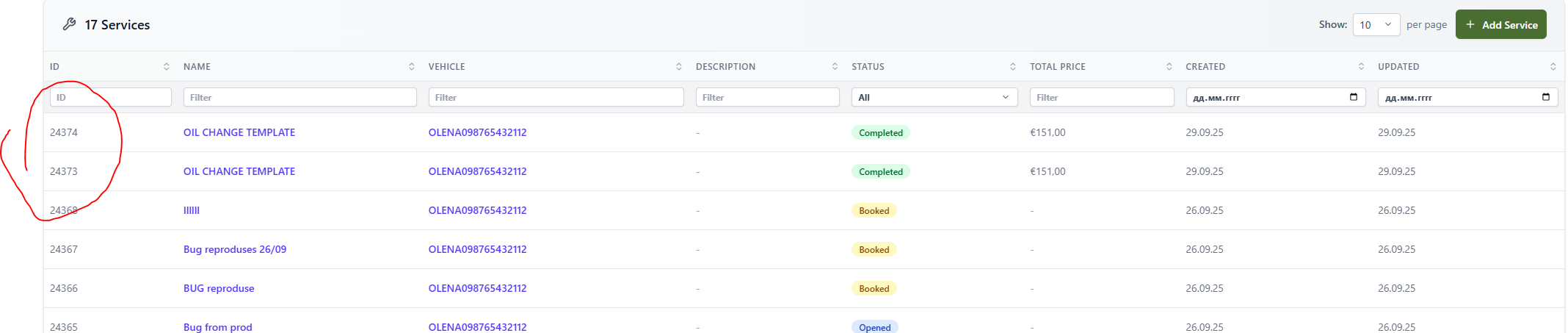
And you have the same service id in the reports, hence the behavior is correct. Please recheck. Thank you!
Updated by Vadim Pariev 9 months ago
- Status changed from Ready for Deployment (prod) to Closed
Updated by Ivan Danyliv 3 months ago
- Assignee changed from Ivan Danyliv to Vadim Pariev
 Updated by Albert Katasonov about 2 months ago
- Project changed from 8 to Roos-fs-ZIP