roos-fs tasks #849
open

Change/add different columns to the service table
0%
Description
Based on the new requirement from the customer the following changes are needed in the services table.
Expected result
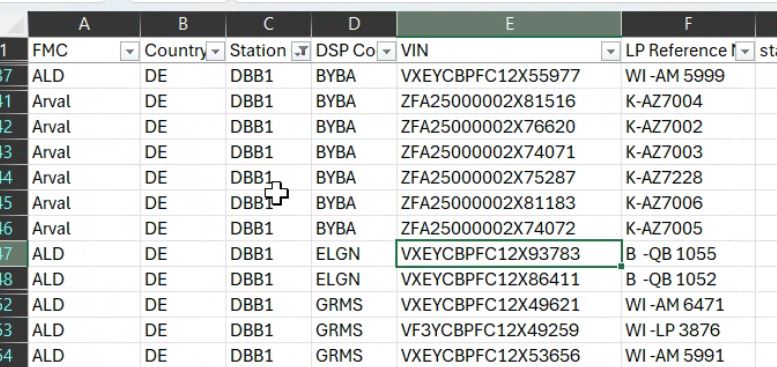
Following order of the columns need to be introduced
- ID
- CUSTOMER (FMC) (taken from the vechicle attached to the service)
- Location (DS) (taken from the vechicle attached to the service)
- Vechicle user (DSP) (taken from the vechicle attached to the service)
- VIN (taken from the vechicle attached to the service)
- Licence Place LP (taken from the vechicle attached to the service)
- Name
- status
- created
- updated
This is a default overview.
Additinal requirements:
- Additionally the user can define what columns he wants to see (3 dot menu in the end of the columns (right side).
- The menu includes all columns above as well as thpse which are present now.
- The settings for the tbale are saved and when the user goes to another page they stay intact.
Files
 Updated by Max Zadorozhniy 7 months ago
- Status changed from In progress to In review
 Updated by Alex Katasonov 6 months ago
- Status changed from In review to Deployed (QA)
Updated by Alex Katasonov 6 months ago
- Assignee changed from Max Zadorozhniy to Olena Tretjakova
 Updated by Olena Tretjakova 6 months ago
· Edited
Updated by Olena Tretjakova 6 months ago
· Edited
- Status changed from Deployed (QA) to QA Failed
- Assignee changed from Olena Tretjakova to Max Zadorozhniy
Environment: Staging.
Actual Result:
-
Click several checkboxes next to the column names in the Customize Columns modal window. The modal window changes its position after each checkbox is clicked. When all items in the modal are unchecked, part of the modal disappears off the left side of the table.
https://screenrec.com/share/r0uTdvK4bZ
https://screenrec.com/share/BIQlb4VGWg
https://screenrec.com/share/Pdq4yjp8Fi
https://screenrec.com/share/2tVF9TUmQb -
When the user logs out and logs in as another user:
The table displays the same visible columns as in the previous session customized by the other user, even if this user has not customized the Services table. https://screenrec.com/share/mjR2ekKf48 -
After the 'Services' table is filtered, the modal changes the number of items (column names) and their status (checked/unchecked).
Filter the Services table by Created date (e.g., 11/10/2025).
Click the ... icon to open the Customize Columns modal.
The Additional Costs column disappears from the modal window. https://screenrec.com/share/SeRIJyqVmQ
Open the 'Services' page. Click '...' icon. Make sure that the modal displays all list completely (12 items) are checked. https://screenrec.com/share/Q1PWftaYEH
Filter the Services table by Updated date (e.g., 11/24/2025).
Click the ... icon to open the Customize Columns modal.
Only 4 unchecked items are listed in the modal, instead of all columns. https://screenrec.com/share/JgqRm9FhvW -
The issues with sorting and filtering columns:
- The ‘Customer’ column does not sort alphabetically (A→Z or Z→A) at all. https://screenrec.com/share/JfVBg9307s
- The ‘Customer’ field does not have an ‘x’ icon to clear the field.
- The ‘Location' column does not have up/down arrows next to the column name and cannot be sorted alphabetically (A→Z or Z→A). https://screenrec.com/share/lw1Xt4vyY5
- The ‘Location’ field does not have an ‘x’ icon to clear the field.
- The 'Vehicle User' column does not have up/down arrows next to the column name and cannot be sorted alphabetically (A→Z or Z→A).
- The ‘Vehicle User’ column cannot be filtered using the ‘Vehicle User’ filter field. https://screenrec.com/share/sJD2fKgCcw
- The ‘Vehicle User’ filter dropdown displays users who are not vehicle users.
- The ‘Vehicle User’ field does not have an ‘x’ icon to clear the field.
- The ‘VIN’ column does not have up/down arrows next to the column name and cannot be sorted alphabetically (A→Z or Z→A) or numerically (lowest → highest / highest → lowest).
- The 'License Plate' column does not have up/down arrows next to the column name and cannot be sorted alphabetically (A→Z or Z→A).
- When hovering over the ‘Additional Costs’ column name, an unnecessary tooltip appears.
- When clicking the up/down sorting arrows next to each column, bold text briefly appears in the first three columns and then disappears.
Acceptance Criteria:
-
The three-dots (...) icon is displayed in the top-right corner of the table header.
-
Clicking the three-dots icon opens a modal/panel.
-
The modal always appears aligned to the right side of the table/page and does not change its position when opened.
-
The modal can be opened and closed multiple times without UI issues.
Modal Content
-
The modal displays a list of all column names in the main table.
-
Each column name is displayed in a separate row.
-
A checkbox is displayed to the left of each column name.
Checkbox Behavior
-
If a checkbox is checked, the corresponding column is visible in the table.
-
If a checkbox is unchecked, the corresponding column is hidden from the table.
-
Column visibility updates immediately after a checkbox is checked or unchecked.
-
The table can be displayed with no visible columns, while the column settings modal remains accessible and functional.
State Persistence
- When a user navigates to another page and then returns to the Services tab:
- The table displays the same visible columns as previously selected.
- The checkbox states in the modal remain unchanged.
- Column visibility settings are persisted per user session (or per user, if applicable). If the user has not customized the table before, they see the default table with all columns.
Filtering Interaction
If the table is filtered by any column:
- The number of columns listed in the modal does not change.
- The checkbox states remain unchanged.
- Filtering the table does not affect column visibility settings.
Steps to Reproduce:
-
Open the 'Services' page. The '...' icon is aligned at the end of the table header.
-
Clicking the '...' icon opens the Customize Columns modal window.
3.Click several checkboxes next to the column names in the Customize Columns modal window. The modal window changes its position after each checkbox is clicked. When all items in the modal are unchecked, part of the modal disappears off the left side of the table.
-
Click the '...' icon several times. The modal appears and disappears.
-
The modal displays a list of all column names in the main table.
-
Each column name is displayed in a separate row.
-
A checkbox is displayed to the left of each column name.
-
Click several checkboxes. When a checkbox is checked, the corresponding column becomes visible in the table.
-
Uncheck several checkboxes. When a checkbox is unchecked, the corresponding column becomes hidden in the table.
-
Column visibility updates immediately after a checkbox is checked or unchecked.
-
The table can be displayed with no visible columns, while the column settings modal remains accessible and functional.
-
Uncheck first and second checkboxes. Navigates to another page and then returns to the Services tab:
- The table displays the same visible columns as previously selected.
- The checkbox states in the modal remain unchanged.
Logout and login again :
- The table displays the same visible columns as previously selected.
- The checkbox states in the modal remain unchanged.
Logout and log in as another user again:
The table displays the same visible columns as in the previous session customized by the other user. https://screenrec.com/share/mjR2ekKf48
- Open the 'Services' page. Click '...' icon. Make sure that the modal displays all list completely (12 items) are checked. https://screenrec.com/share/Q1PWftaYEH
Filter the Services table by Created date (e.g., 11/10/2025).
Click the ... icon to open the Customize Columns modal.
The Additional Costs column disappears from the modal window. https://screenrec.com/share/SeRIJyqVmQ
Open the 'Services' page. Click '...' icon. Make sure that the modal displays all list completely (12 items) are checked. https://screenrec.com/share/Q1PWftaYEH
Filter the Services table by Updated date (e.g., 11/24/2025).
Click the ... icon to open the Customize Columns modal.
Only 4 unchecked items are listed in the modal, instead of all columns. https://screenrec.com/share/JgqRm9FhvW
 Updated by Vadim Pariev 6 months ago
- Assignee changed from Max Zadorozhniy to Olena Tretjakova
Updated by Vadim Pariev 6 months ago
- Assignee changed from Olena Tretjakova to Max Zadorozhniy
Updated by Vadim Pariev 6 months ago
- File clipboard-202512102141-czbjq.png clipboard-202512102141-czbjq.png added
- File clipboard-202512102143-udc0e.png clipboard-202512102143-udc0e.png added
- File clipboard-202512102143-rq6lp.png clipboard-202512102143-rq6lp.png added
Addendum:
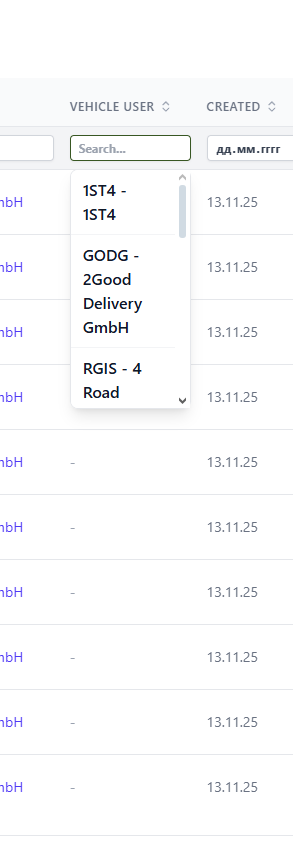
The vechile user filter is implimented incorrectly it displays the users and not the entity Vechilce user. No search is working for them as well.
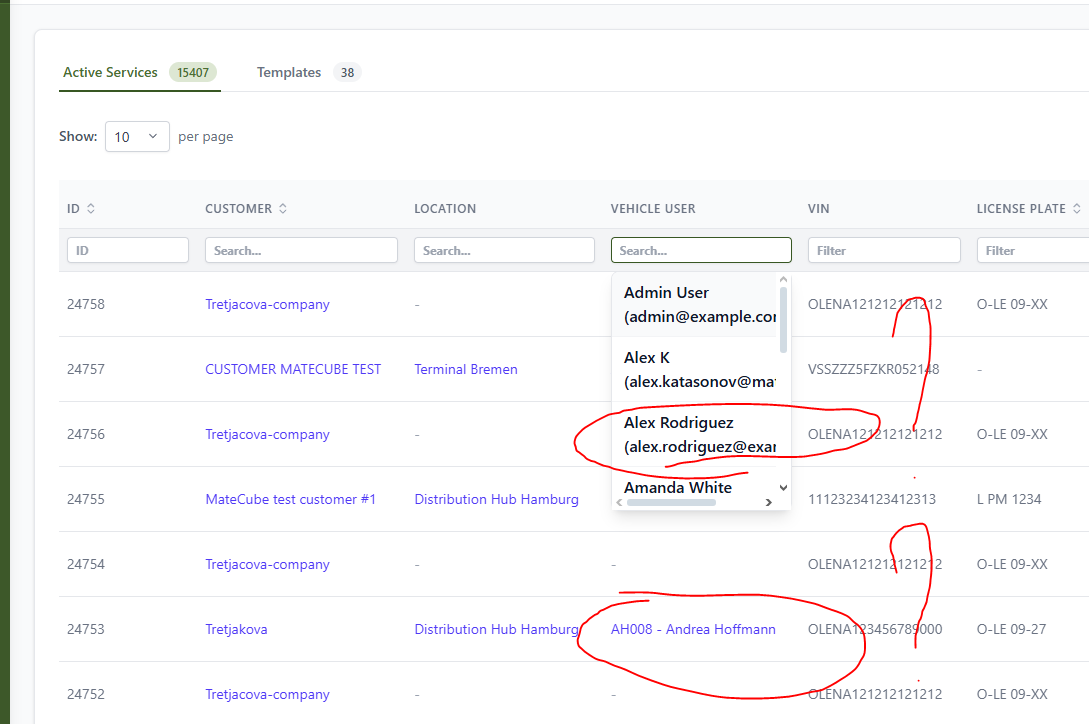
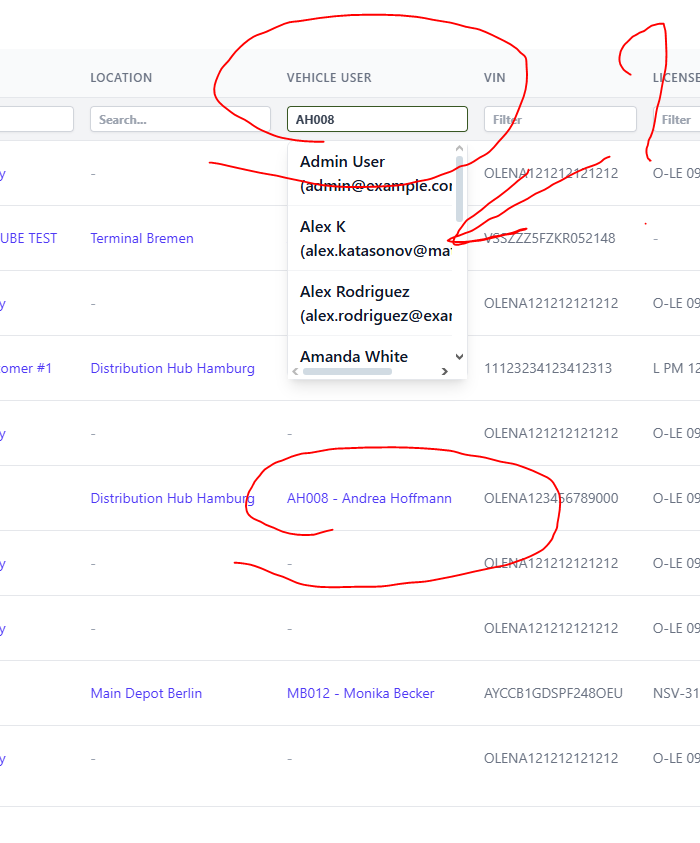
expected result:
Updated by Vadim Pariev 6 months ago
- We igrnore for now the overlaping issue with the column selector. (issue when the selector is not completely see if there only a couple of etnries in the table)
Reason we would rework the filtering and sorting implimentation.
Updated by Max Zadorozhniy 6 months ago
- Status changed from Open to In progress
Updated by Max Zadorozhniy 6 months ago
- Status changed from In progress to In review
Updated by Max Zadorozhniy 6 months ago
The customer filter does not have a cross in it. This is a global component, and it was not changed in this ticket.
Updated by Max Zadorozhniy 6 months ago
- Status changed from In review to Deployed (QA)
Updated by Max Zadorozhniy 6 months ago
- Assignee changed from Max Zadorozhniy to Olena Tretjakova
Updated by Olena Tretjakova 6 months ago
· Edited
- Status changed from Deployed (QA) to Ready for Deployment (prod)
Environment: Staging.
Actual Result:
The ‘…’ modal should be positioned so that it is vertically aligned with the ‘…’ button and appears horizontally close under the button.
All other conditions have been met.
- The modal does not change its position after number of columns changed.
- The number of columns does not change after the user navigate to others pages and returns.
- When a new user opens the “Services” page, all columns are displayed by default, and all checkboxes in the modal are checked.
- The number of columns does not change after the user applies filters to the Services table.
- The 'Vehicle user' field displays correct users.
- The 'Completed/Canceled' field displays correct users.
Updated by Alex Katasonov 6 months ago
- Status changed from QA Failed to Deployed (QA)
Updated by Alex Katasonov 6 months ago
- Assignee changed from Max Zadorozhniy to Olena Tretjakova
Updated by Olena Tretjakova 6 months ago
- Status changed from Deployed (QA) to Ready for Deployment (prod)
- Assignee changed from Olena Tretjakova to Vadim Pariev
Environment: Staging.
Actual Result:
The ‘…’ modal ші positioned so that it is vertically aligned with the ‘…’ button and appears horizontally close under the button.
All other conditions have been met.
Updated by Vadim Pariev 6 months ago
- Status changed from Ready for Deployment (prod) to Closed
 Updated by Albert Katasonov about 2 months ago
- Project changed from 8 to Roos-fs-ZIP